 RapidRAW
Breaking the Speed Limit: How the WGPU Renderer Works
How I bypassed the browser to make RapidRAW’s editing engine lightning fast.
Welcome to the first behind the scenes look at RapidRAW. Today I want to talk about processing speed.
From day one, the goal of this project was to build a RAW editor that feels truly instant. When you move the exposure slider, the image should update immediately, without any lag or stutter.
To do this, I wrote the entire image processing engine to run directly on your graphics card (GPU). The GPU is incredible at doing math on millions of pixels at once. Calculating a new exposure or contrast value takes practically zero time. To be fair, it wasn't actually slow before. But on high resolution images, dragging a slider would run at about 20 frames per second. It was fine, but it wasn't buttery smooth. Why?
The Hidden Bottleneck
RapidRAW is built using Tauri. This means the core backend is written in Rust, but the user interface you actually see and click on is built with React and runs in a webview (which is essentially a lightweight web browser).
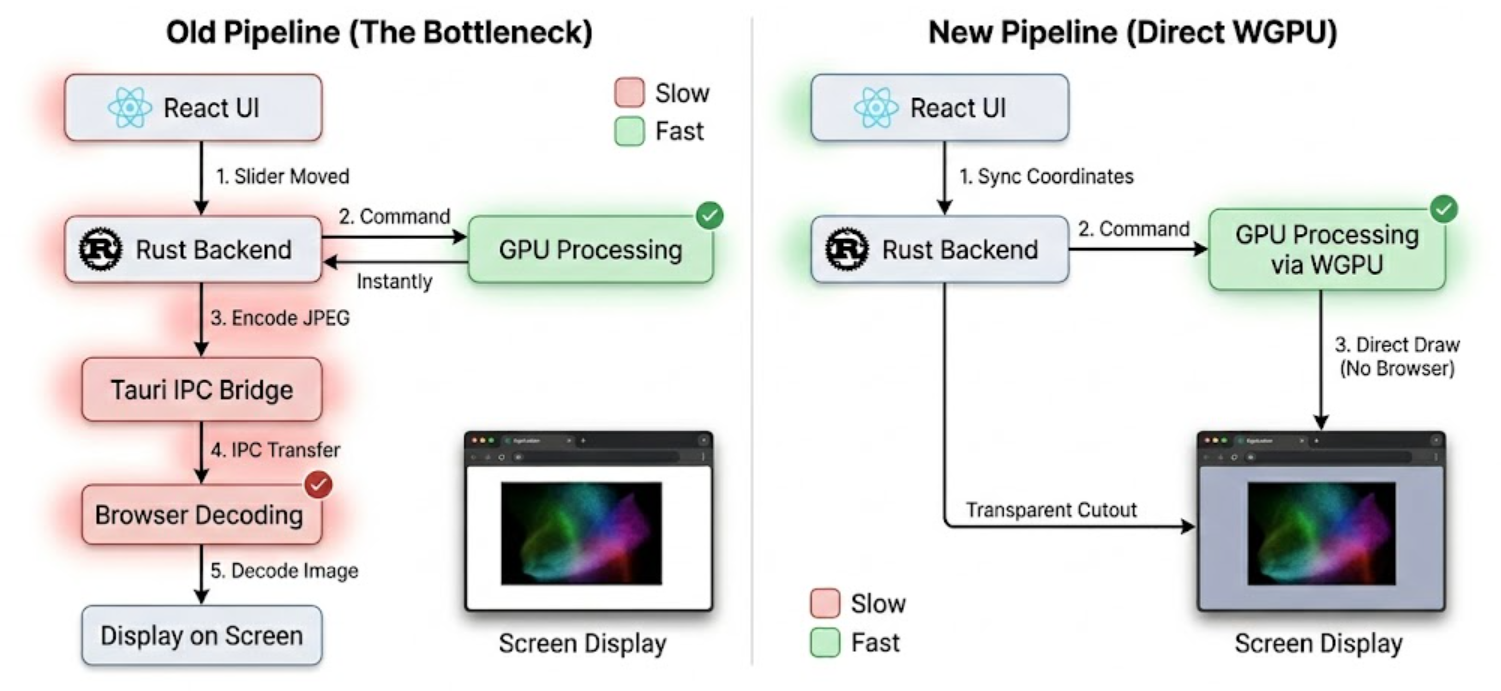
Here is what was happening every time you moved a slider in older versions:
- React tells Rust the slider moved.
- Rust tells the GPU to calculate the new image. (Instant)
- Rust takes the finished image from the GPU and encodes it into a JPEG. (Slow)
- Rust sends this JPEG across the Tauri bridge (IPC) to the frontend. (Slow)
- The browser decodes the JPEG and displays it on your screen. (Slow)
The actual editing took milliseconds, but the packaging, shipping, and unpacking took way too much time. I needed to ditch the slow encoding and the Tauri IPC bridge entirely.
The Transparent Cutout Trick
If sending the image to the browser was the problem, the solution was simple. Do not send it to the browser.
Instead, I implemented a direct WGPU renderer. WGPU is a modern graphics framework that lets Rust talk directly to your graphics card.
Now, the editor interface and the image surface are basically two completely separate processes. I made the center of the RapidRAW webview completely transparent. It is exactly like a digital window with a hole cut out in the middle. The Rust backend uses WGPU to draw the high resolution, uncompressed image directly onto your screen, right behind that transparent cutout.
The browser never touches the image. There is no JPEG encoding, no IPC transfer, and no browser decoding. The GPU processes the pixels and immediately puts them on your monitor.
Syncing Two Worlds
This sounds great in theory, but it introduced a massive headache. Because the image and the user interface are now two separate layers that do not talk to each other naturally, they can easily get out of sync.
When you pinch your trackpad to zoom in, or click and drag to pan around, you are interacting with the React frontend. React knows exactly where your mouse is and how far you want to zoom. But the Rust backend, which is actually drawing the image, has no idea.
I had to build a system where React constantly shouts its exact coordinates, zoom scale, and clipping boundaries down to Rust. Every single frame you pan or zoom, React calculates the exact math of the viewport and sends a tiny data packet to WGPU. WGPU then instantly redraws the image at the new coordinates behind the transparent cutout.
Getting this math right was a real challenge. If the coordinates were off by even a single pixel, the image would drift away from your mouse as you zoomed, or bleed over the edge of the editing panels.
The Result
After a lot of tweaking, the sync is now seamless. You can pan, zoom, and drag sliders, and it feels like one unified application. The WGPU layer updates instantly behind the React interface.
By skipping the encoding and decoding steps, RapidRAW now feels incredibly fast. Instead of dropping to 20fps on large files, dragging a slider now runs at 120fps or whatever maximum refresh rate your monitor allows. It is these kinds of architectural changes that make building this app so much fun. You get to completely break the rules of normal web development to extract every last drop of performance from the hardware.
I hope this gives you a good idea of what is happening under the hood. See you in the next update!
Back to all posts