 RapidRAW
Depth Effects
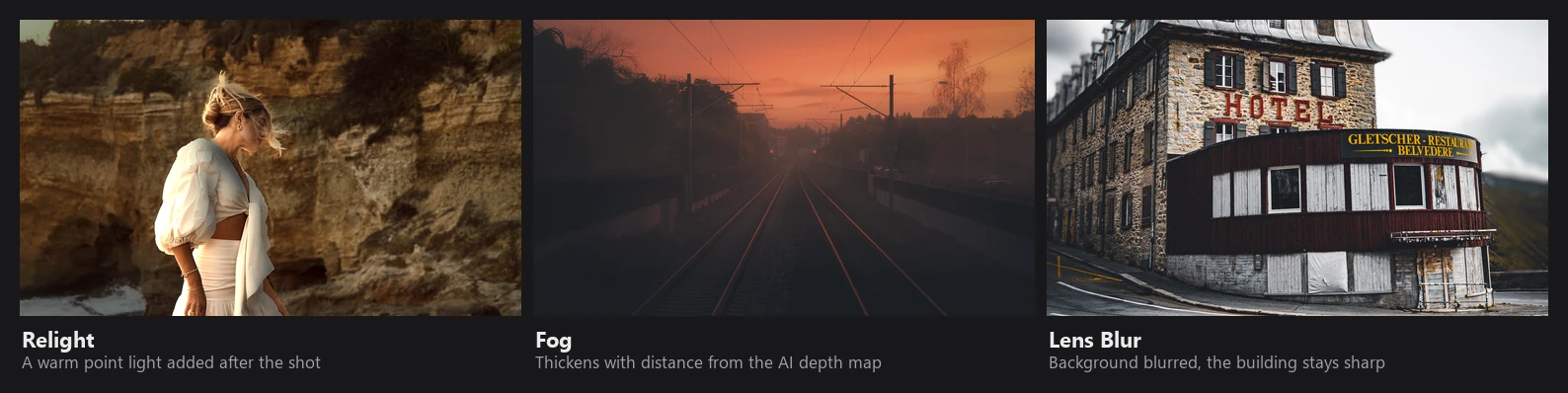
Relight, Fog and Lens Blur add light, atmosphere and depth of field using AI estimates of the scene's 3D shape. They run on the CPU in linear light, after geometry corrections and before crop and the GPU adjustments:
Because they come before the GPU adjustments, your exposure, color and tone edits apply to the result, just as if the light or fog had been there when you took the photo.
Depth and normal maps
| Map | Model | Resolution | Used by |
|---|---|---|---|
| Depth | Depth Anything V2 (small) | long side 518 px | Fog, Lens Blur, Depth mask |
| Normals + depth | MoGe-2 (small) | long side up to 768 px | Relight |
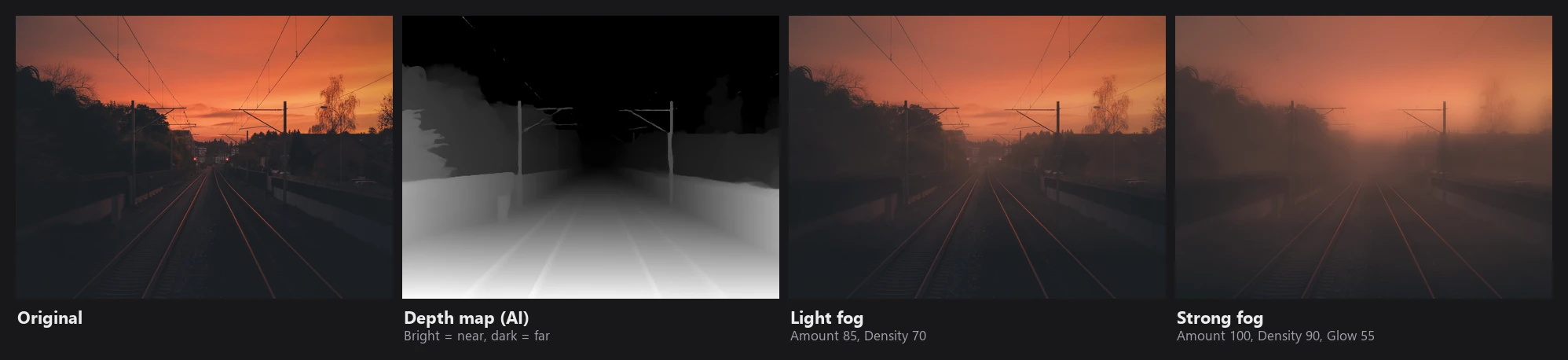
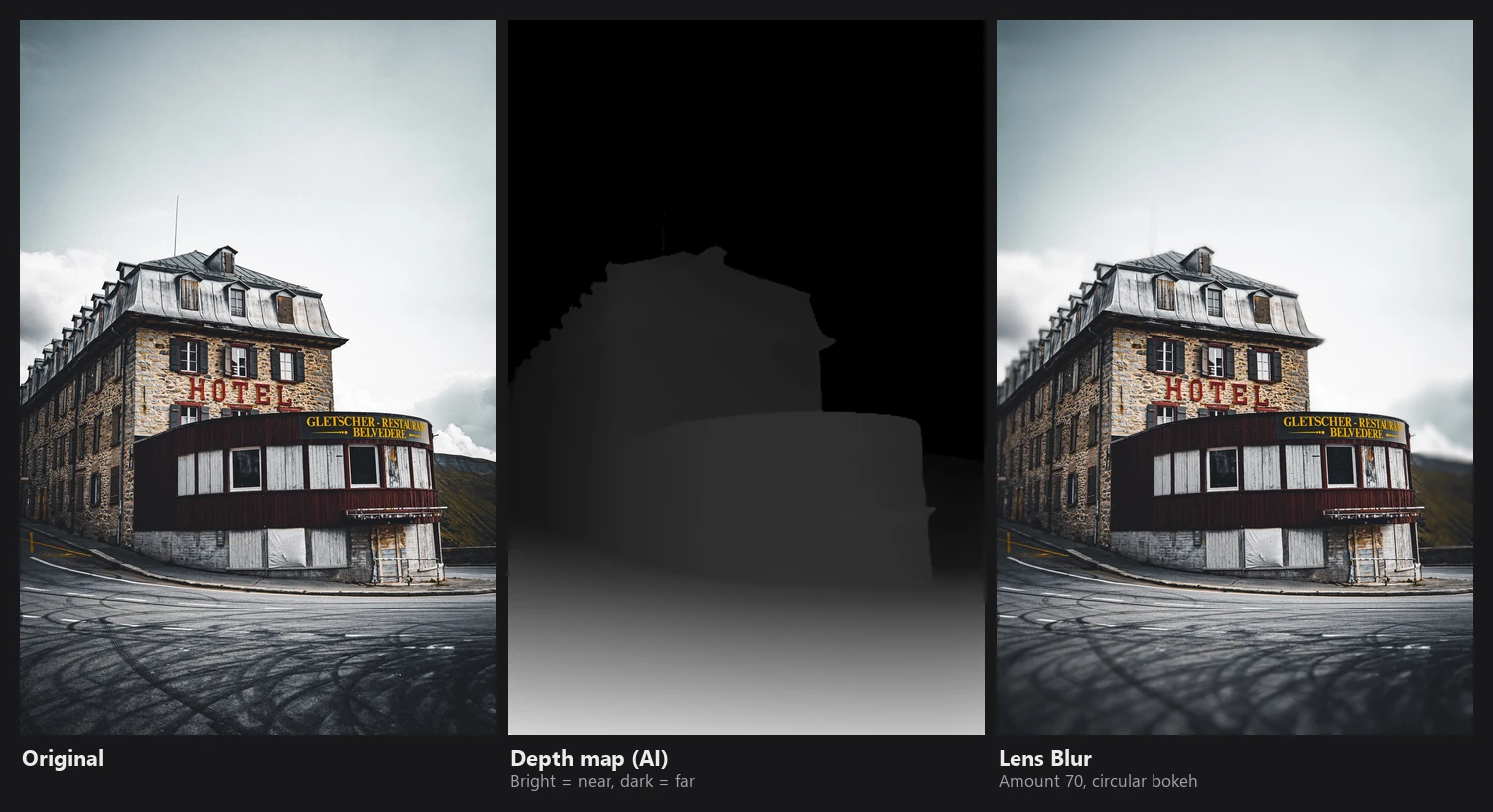
- Depth Anything gives relative inverse depth: bright is near, dark is far, normalized per photo. It doesn't know real distances, only the order of things.
- MoGe-2 estimates the direction each surface faces (a normal map) and a 3D point map, from which RapidRAW also derives a depth channel.
- Maps are computed once per file from the unedited image, saved in the AI map cache on disk (4 GB by default) and warped to match your current geometry corrections. For normals, the direction is also rotated to follow rotations and perspective corrections.
Edge-aware upsampling
The maps are small, but the effects need edges that match the full-resolution photo. All three tools upsample their maps with a guided filter, using the square root of the photo's luminance as the guide. Where the photo has an edge, the map gets the same edge; in smooth areas, the map stays smooth.
Lens Blur uses a stricter version: it only lets the depth follow the photo where the photo has clear structure, and clamps each value to a range based on its neighbours, which prevents halos around subjects.
Relight
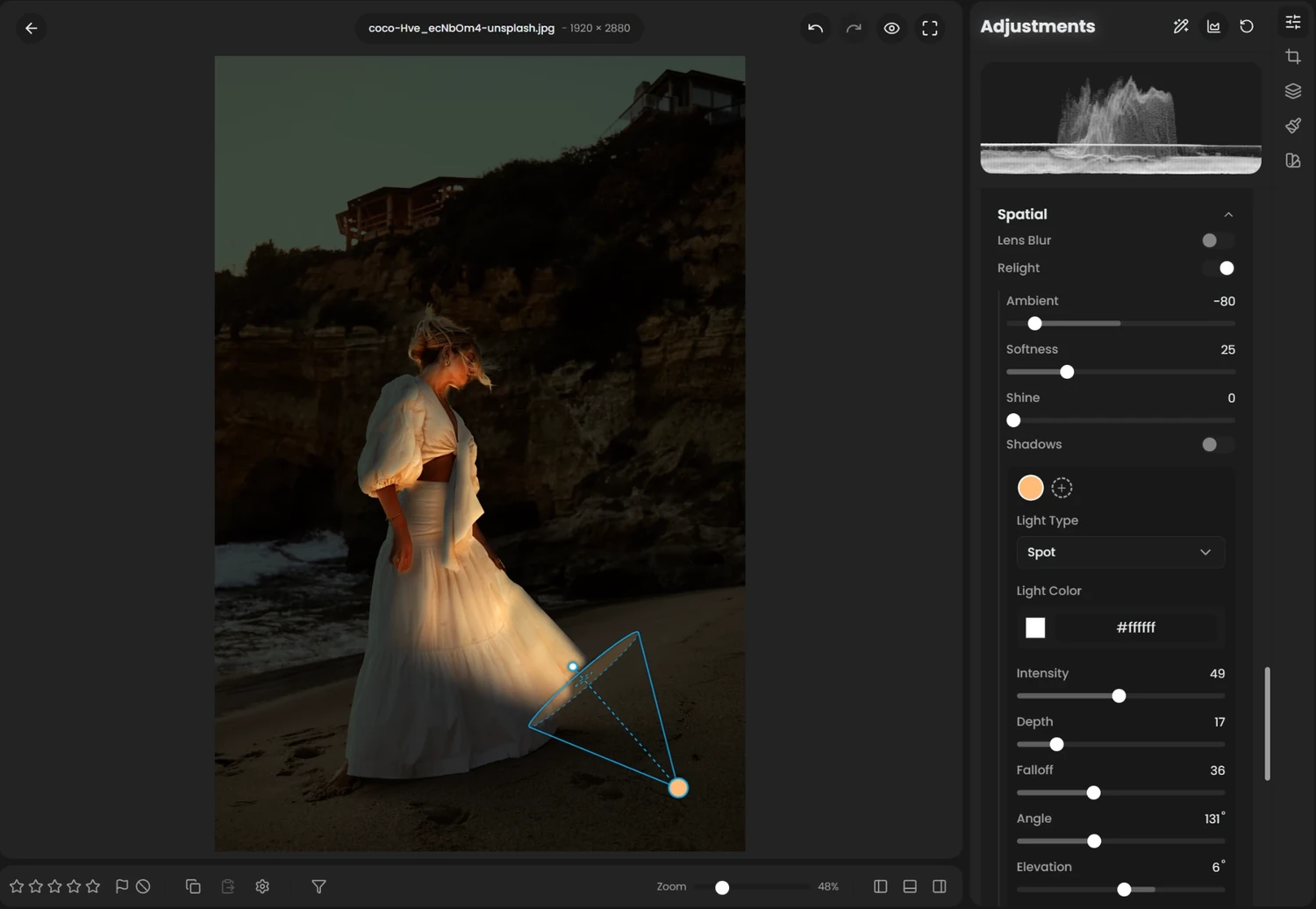
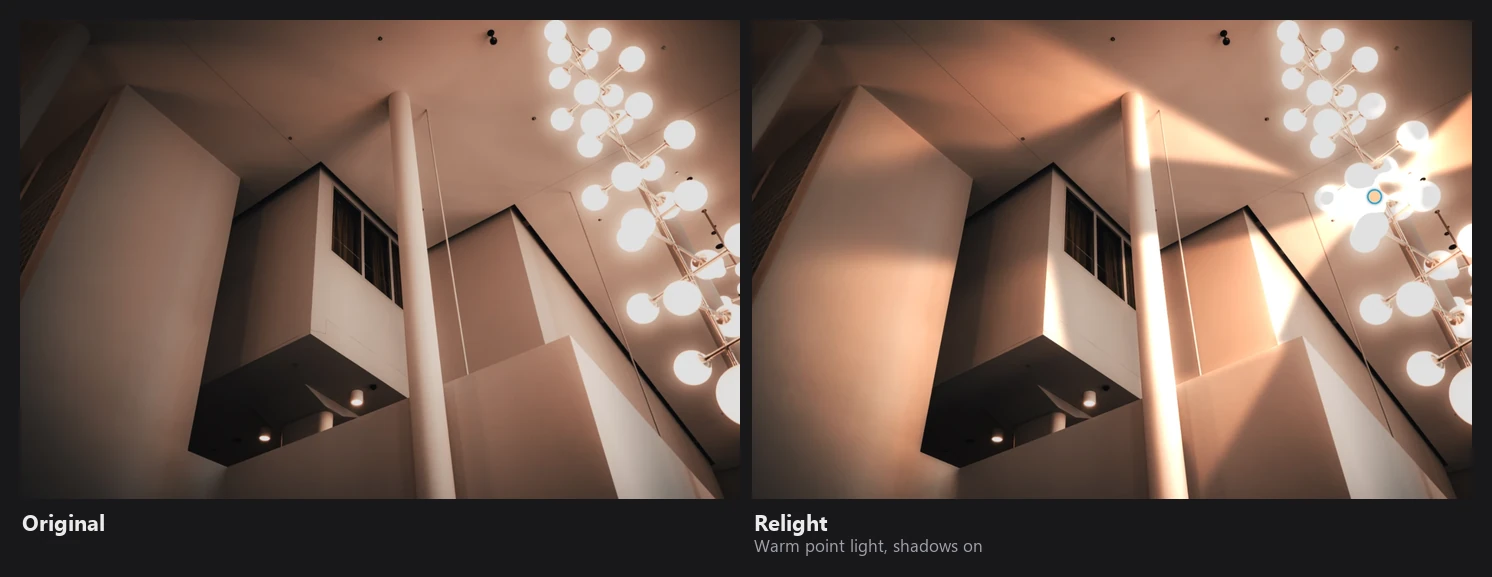
Relight treats each pixel as a small surface with the normal from the map, and lights it with a virtual light:
gain = 2^(ambient/50)                                          start with the ambient level
for the light:
    diffuse  = max(0, (N·L + softness) / (1 + softness))       wrapped Lambert
    specular = (N·H)^(8 + 56·(1 − softness)) · shine · 2       Blinn
    gain    += light color · (diffuse + specular) · attenuation · shadow
rgb = rgb · gain
- Wrapped Lambert lets light wrap a little around edges, so the falloff is soft like a large light source rather than a hard terminator. Softness controls how much (see the chart below).
- Light types:
- Directional (like the sun) uses angle and elevation, with no falloff.
- Point has a position and radius, with falloff
r² / (r² + distance²). - Spot is a point light with a cone (5° to 85°) and a soft edge (feather).
- The light color is normalized by its luminance, so changing color doesn't change brightness. Negative Ambient darkens the scene, so the light stands out.
- Shadows (optional) are ray-marched in screen space: from each pixel, 64 steps toward the light; a step that goes behind the depth surface counts as blocked. The shadow map is blurred (Shadow Softness) and upsampled with the guided filter.
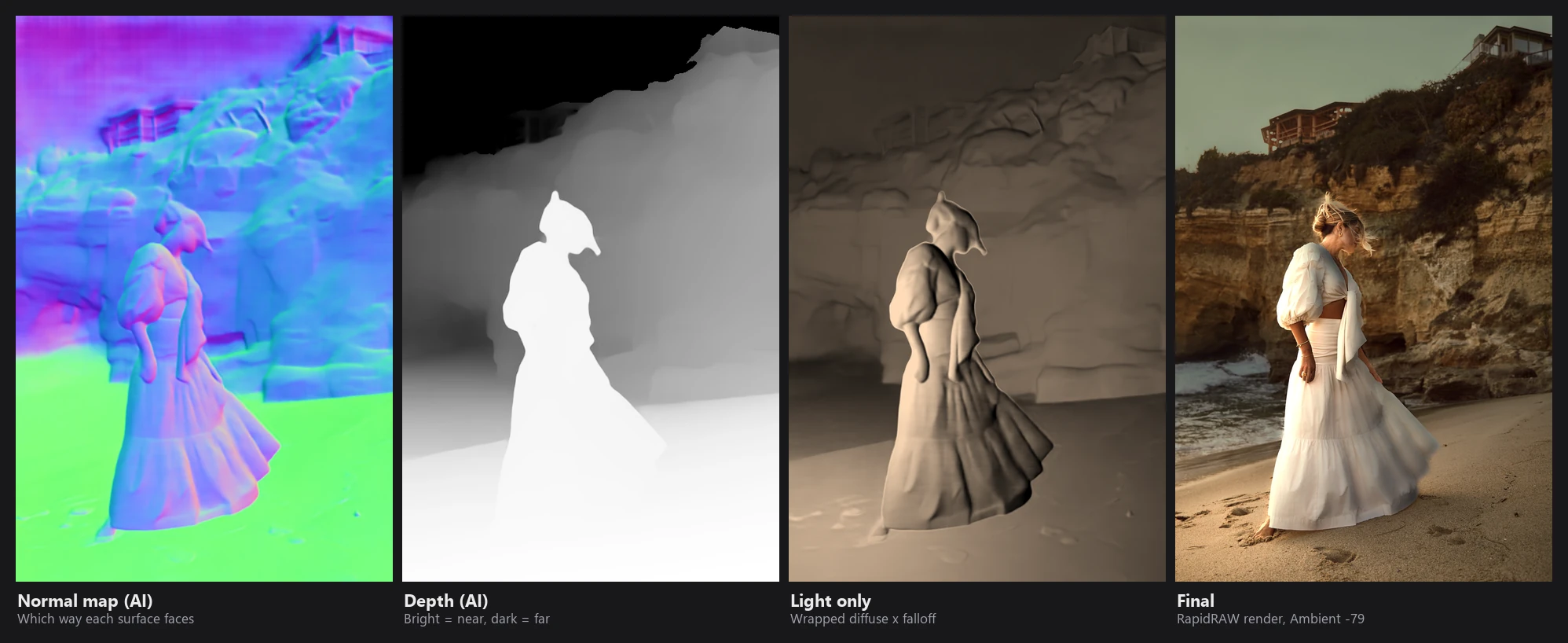
diffuse · attenuation for one warm point light at the left edge (Softness 28, Radius 36), computed from RapidRAW's normal map with the formula above, since the app doesn't output this pass on its own. The final image is RapidRAW's render with Ambient −79.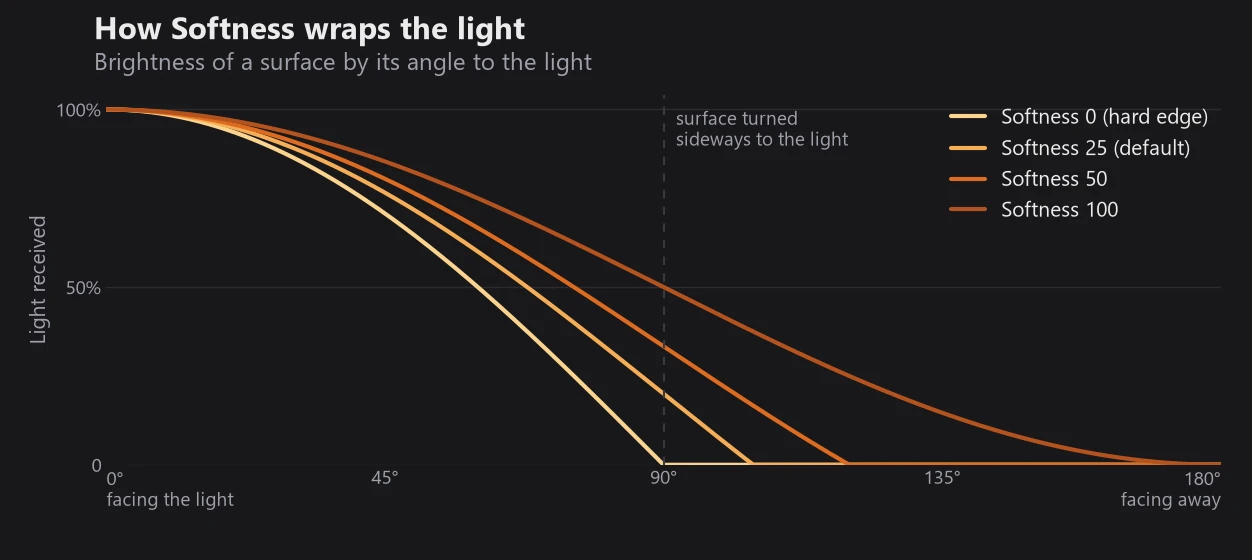
max(0, (cos θ + softness) / (1 + softness)) plotted for four Softness values. At 0 it is plain Lambert lighting with a hard cut-off at 90°; at 100 light reaches all the way to surfaces facing away.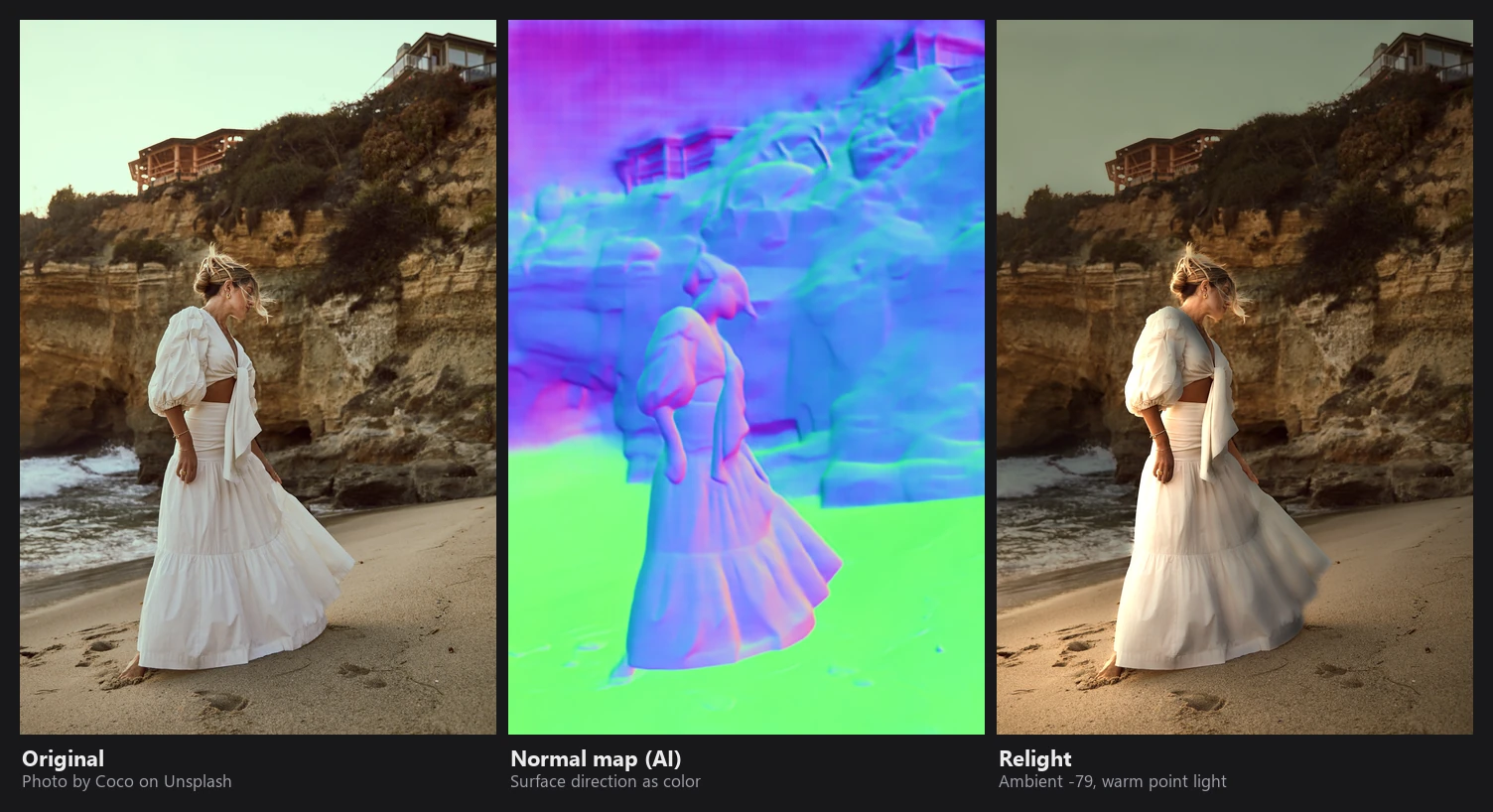
Fog
Fog uses the Beer–Lambert law: light passing through fog decays exponentially with distance.
- Distance from depth:
distance = (1/(d + 0.1) − 1/1.1) / (1/0.1 − 1/1.1), which turns relative inverse depth back into a 0 (near) to 1 (far) distance. Start moves where the fog begins. - Ground fog: density is multiplied by
exp(−height · up), so fog gets thicker toward the bottom of the frame. - Variation: 4 octaves of value noise, stretched horizontally, create uneven fog banks.
- Extinction: the fog amount follows Beer–Lambert (formula below). It's normalized so Amount is exactly the fog strength at the farthest point.
- Fog color from the scene: RapidRAW averages the color of the far parts of the image, desaturates it by 40%, and uses that as the fog color (tinted by Temperature and Tint). So fog in a sunset is warm and fog in a blue hour is blue, without any setting.
- Scattering and glow: the fog is mixed 35% with a blurred copy of the image (light scattering inside the fog), and bright areas add a large soft halo, controlled by Glow.
Extinction and the final mix:
optical depth = density · distance · ground term · variation
fog           = amount · (1 − e^(−optical depth)) / (1 − e^(−density))
out           = image · (1 − fog) + (fog color + scattering + glow) · fog
Lens Blur
Lens Blur simulates a shallow depth of field.
Circle of confusion. Each pixel gets a blur radius from its depth. Pixels inside the in-focus range stay sharp; pixels farther away get a positive radius (background blur) and nearer ones a negative radius (foreground blur). The maximum radius is 1.2% of the long side at Amount 100.
Rendering in layers. Real bokeh can't be made with a single variable blur, because blurred foreground objects must spread over sharp edges behind them, while blurred background must not leak over sharp foreground. RapidRAW:
- Splits the image into 5 layers by blur radius, separately for background and foreground.
- Blurs each layer with a real aperture shape (circle, hexagon, octagon or ring/mirror lens), drawn with up to 128 samples on a golden-angle spiral. The aperture is slightly brighter at the rim, like real lenses.
- Does the blurring in an energy domain (squared values), so bright highlights dominate and turn into proper bokeh balls instead of greyish blobs.
- Adds cat's-eye bokeh: toward the edges of the frame, the aperture is clipped, as in real lenses with optical vignetting.
- Composites back to front: the blurred background, then the sharp original where it's in focus (at full resolution), then the blurred foreground over everything.
Diffusion softens the aperture shape and adds a gentle glow to out-of-focus highlights.
Limits
- Depth is relative and estimated from one image, so it can be wrong on glass, reflections, fine hair and unusual scenes. The guided upsampling hides small errors but not large ones.
- The models only see one image, so there's no information about what's hidden behind objects.