 RapidRAW
Rendering Pipeline
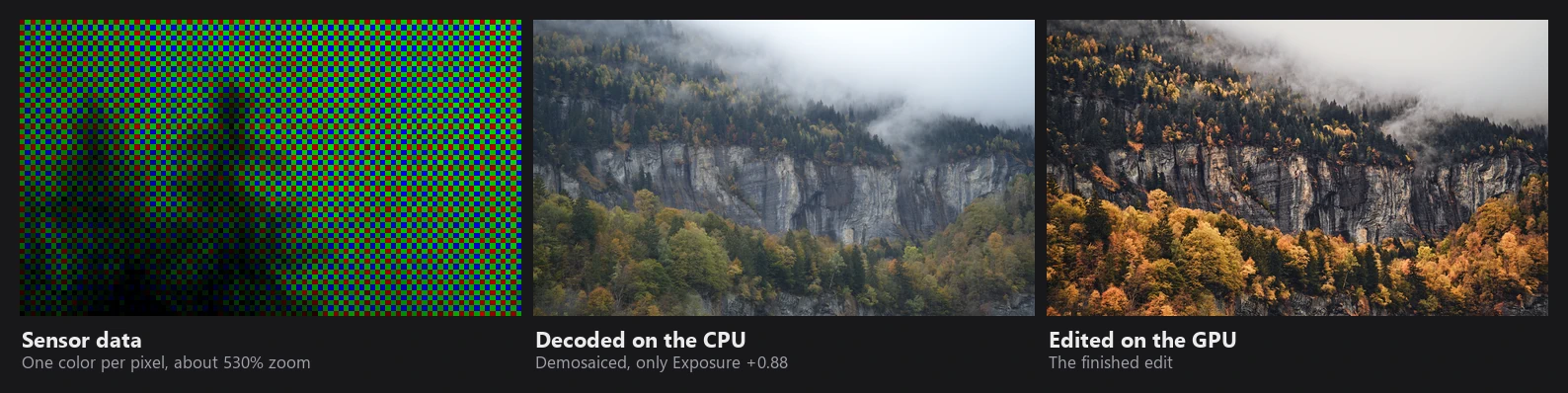
This section explains how RapidRAW works inside. It is written for people who want to know exactly what a slider does, compare RapidRAW with other raw developers, or contribute to the code. You don't need any of it to edit photos.
Overview
Every time the image is shown or exported, RapidRAW renders it from the original file plus your settings. Nothing is baked in. The work is split into a CPU part, which runs once per photo or when geometry changes, and a GPU part, which runs on every slider move.
The order in which you move sliders never matters. The shader always applies them in the same sequence, described in Tone & Color and Detail & Effects.
Working color spaces
| Stage | Space |
|---|---|
| RAW after decoding | Scene-linear RGB with Rec.709/sRGB primaries and a D65 white. Values above 1.0 are kept (up to 1000), so highlight data is not clipped. White balanced to "as shot". |
| Non-RAW files | Stay sRGB-encoded on the CPU. The shader converts them to linear with the exact sRGB curve. |
| GPU input texture | RGBA 16-bit float (half precision). |
| Noise reduction | Square-root ("variance stabilized") luminance, so noise is roughly equal in shadows and highlights. |
| Clarity, Structure, tonal base | log2 luminance (stops), through guided filters. |
| Exposure, white balance, color grading, vignette | Scene-linear. White balance is a Bradford adaptation in LMS space. |
| Whites, Shadows, Blacks, Contrast | Luminance in a gamma 2.2 encoding, applied back as linear ratios. |
| HSL mixer, Hue | HSV of sRGB-encoded values; luminance measured in linear Rec.709. |
| Tone mapper | Linear to display. AgX uses a Rec.2020-based rendering space. |
| Film emulations | Panasonic V-Log encoding of the linear image, then a 3D LUT. |
| Brightness, Curves, custom LUTs, Grain | Display-referred, 0 to 1. |
| Output | 8-bit (with dither) or 16-bit float for 16-bit TIFF exports. Exports get an sRGB profile. |
RapidRAW does not use ACEScg or Rec.2020 as a general working space. Linear Rec.709 is used up to the tone mapper; AgX internally renders in a wider space.
CPU and GPU
CPU (Rust, multi-threaded with Rayon): RAW decoding and demosaicing, highlight reconstruction, color matrices, base noise reduction and sharpening, AI models (through ONNX Runtime), mask rasterization, inpainting, geometry warps, Relight, Fog and Lens Blur, merges and encoding.
GPU (wgpu, WGSL shaders): all adjustments in the Adjustments panel and inside masks, noise reduction and sharpening sliders, glow, halation and flares, tone mapping, LUTs and grain. The shaders are in shaders/shader.wgsl, guided.wgsl, blur.wgsl, flare.wgsl and display.wgsl.
What happens on a slider move
- The image is already on the GPU as a 16-bit float texture, with helper textures computed once per photo: guided-filter coefficients for Clarity, Structure and the tonal base, and a haze map for Dehaze. These helpers are calculated on a grid with a short side of at most 1080 px, so local-contrast tools look the same in a small preview and a full-size export.
- RapidRAW compiles a specialized version of the shader that only contains the features you use. Until it's ready, a generic version with everything is used (same result, a bit slower).
- Up to four blurred copies are made when needed (for sharpening, halation and glow). They are only recalculated when the image or size changes, not on every slider move.
- The main shader runs once per 2048 px tile (with 128 px overlap) and writes the result.
Preview vs. export
| Editor preview | Export | |
|---|---|---|
| Resolution | Matched to the size shown on screen and your zoom (Dynamic, the default). In Fixed Resolution mode, a set long edge such as 1920 px. | Full resolution. |
| While dragging | Can be downscaled 1.2x (Performance mode) for speed. When zoomed in, only the visible area is rendered. | n/a |
| Output | 8-bit, drawn directly to the window. | 8-bit, or 16-bit float for 16-bit TIFF. |
Effects with a radius (blurs, grain, noise reduction search) scale with the image size, so a setting looks the same in the preview and the export. A few small fixed-size windows (the 3x3 neighbourhood used to limit sharpening halos, the noise reduction patches) can look slightly stronger on a small preview.
Caches
RapidRAW keeps several caches so that it only recomputes what changed:
| Cache | Contents | Size |
|---|---|---|
| Decoded images | Fully developed linear images, after base NR and sharpening. Images that are not active are compacted to half precision. | 5 images or 1/5 of RAM |
| Preview stages | Base with AI denoise and patches, downscaled working copy, geometry-warped copy, effects (Relight, Fog, Lens Blur). Each stage is only recomputed when its inputs change. | 1 per stage |
| GPU textures | Uploaded image and its helper textures. | 3 images |
| AI Denoise | Denoised images on disk (.rrdn, half precision). |
10 GB |
| AI maps | Depth and normal maps on disk (PNG). | 4 GB |
| Thumbnails | JPEG thumbnails on disk. | 10 GB |
| Masks | Rasterized masks in memory. | 128 MB |
Limits can be changed in Settings → Data Management.
A file is identified by a hash of its size and its first and last 64 KB, so AI results survive renames and moves, and are recalculated when the file content changes.
Pages in this section
- RAW Processing: decoding, demosaicing, highlight reconstruction, camera color, base noise reduction and sharpening.
- Tone & Color: exposure, white balance, tonal sliders, HSL, color grading, tone mappers, film emulation and curves.
- Detail & Effects: noise reduction, sharpening, clarity, structure, dehaze, glow, halation, flares and grain.
- AI & Masks: the AI models, how masks are built and combined, AI Denoise and inpainting.
- Depth Effects: Relight, Fog and Lens Blur.
- Geometry, Merging & Export: lens correction, perspective, auto tools, panorama, HDR, focus stacking and file output.