 RapidRAW
RAW Processing
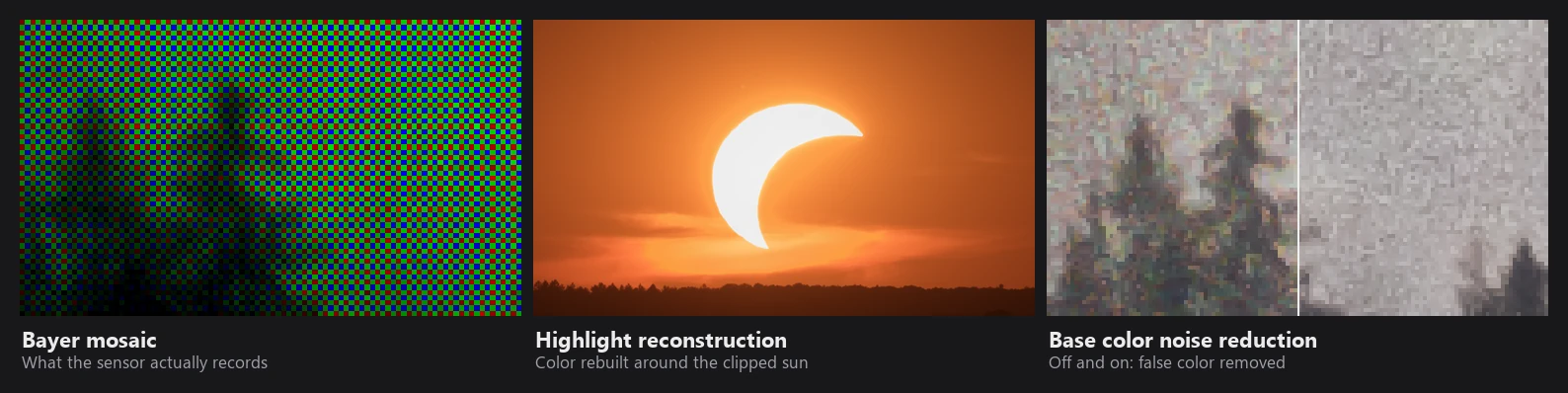
This page follows a RAW file from the bytes on disk to the linear image that the GPU edits. The code lives mainly in raw_processing.rs, highlight_reconstruction.rs, white_balance.rs, baseline_exposure.rs and image_processing.rs, plus the rawler decoder from the RapidRAW-DngLab fork of dnglab.
Most demos use real RAW files from Sony cameras. The highlight reconstruction demos use a synthetic test DNG with a clipped sun, because there the exact scene is known and every clipped channel can be mapped. All photos on this page are real RapidRAW output; the charts plot the formulas from the code.
1. Decoding
RAW or not is decided by the file extension. For RAW files, rawler identifies the format by looking at the content (TIFF tags, container types, the camera make) and picks the right decoder. Files are memory-mapped, so opening is fast even on slow disks.
RapidRAW only uses part of rawler's develop pipeline: it keeps rescaling, demosaicing and cropping to the active area, and does its own white balance, color conversion, highlight reconstruction and gamma handling.
If decoding fails, RapidRAW looks for the largest JPEG preview embedded in the file, converts it to linear light and scales it by 0.4 so it sits at a RAW-like level. You can still edit it, but it is the camera's processed preview.
Apple RAW 9 (macOS 27+, optional). When enabled, Apple's Core Image RAW engine develops the file instead (with highlight recovery on and all its own "looks" off) and returns extended linear sRGB. RapidRAW's own decoding steps below are then skipped.
Non-RAW files (JPEG, PNG, TIFF, ...) are decoded, rotated by their EXIF orientation and kept sRGB-encoded. The GPU converts them to linear.
2. Normalization
- Black level is subtracted per position in the 2x2 color filter pattern. Values below black are clipped to 0.
- White level: RapidRAW scales the data so that 1.0 equals the sensor's white level. Values above it are kept (up to 1000) instead of being clipped, so later steps can still work with them.
- DNG linearization tables are applied while unpacking. DNG opcode lists (for example lens corrections stored by phones) are not applied.
- Crop: the default crop from the file or the camera database is used. Highlight reconstruction only looks at pixels inside this crop, so masked border pixels don't confuse it.
3. Demosaicing
A camera sensor records only one color per pixel, in a mosaic pattern. Demosaicing estimates the two missing colors.
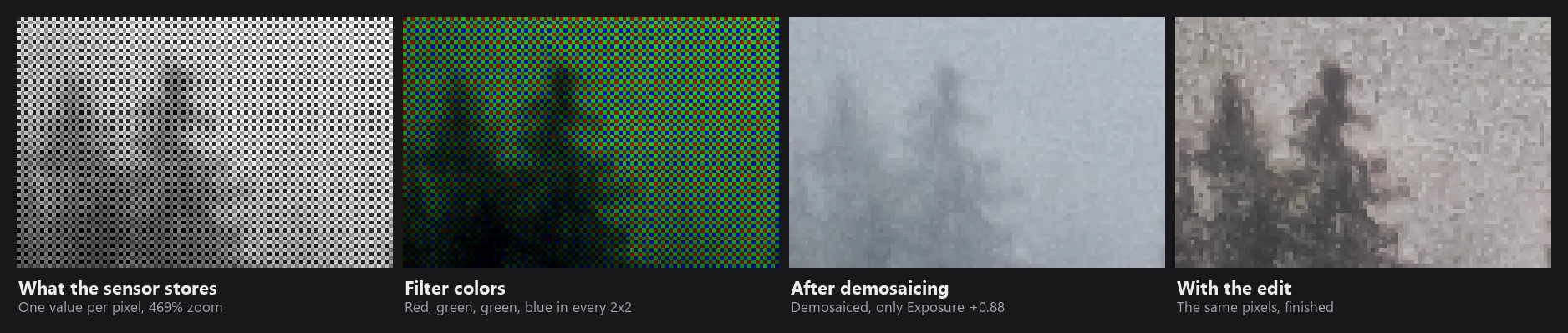
| Sensor | Editor and export | Thumbnails (fast mode) |
|---|---|---|
| Bayer (2x2) | PPG (Patterned Pixel Grouping) | Superpixel, 1/4 size |
| Fujifilm X-Trans (6x6) | Gradient-directed interpolation, 4 passes | 6x6 block average |
| 4-color sensors | Bilinear | Superpixel |
PPG works in three steps:
- Green at red and blue pixels. Four directional gradients are computed (north, south, east, west), each combining the difference to the same color two pixels away and the difference of the green neighbours. Interpolation follows the direction with the smallest gradient, with a correction from the same-color channel (formula below).
- Red and blue at green pixels use "hue transit": if green changes monotonically between the neighbours, red or blue follow the same proportion; otherwise the average is corrected by the local green curvature.
- Blue at red and red at blue pixels choose the smoother of the two diagonals and use hue transit along it.
The green step in detail:
N = 2·|x − c(−2,0)| + |G(−1,0) − G(+1,0)|      (and S, E, W likewise)
G = (3·G_near + G_far + x − c_2away) / 4      along the smoothest direction
Demosaicing runs on data that is not yet white balanced, as most raw developers do.
False color
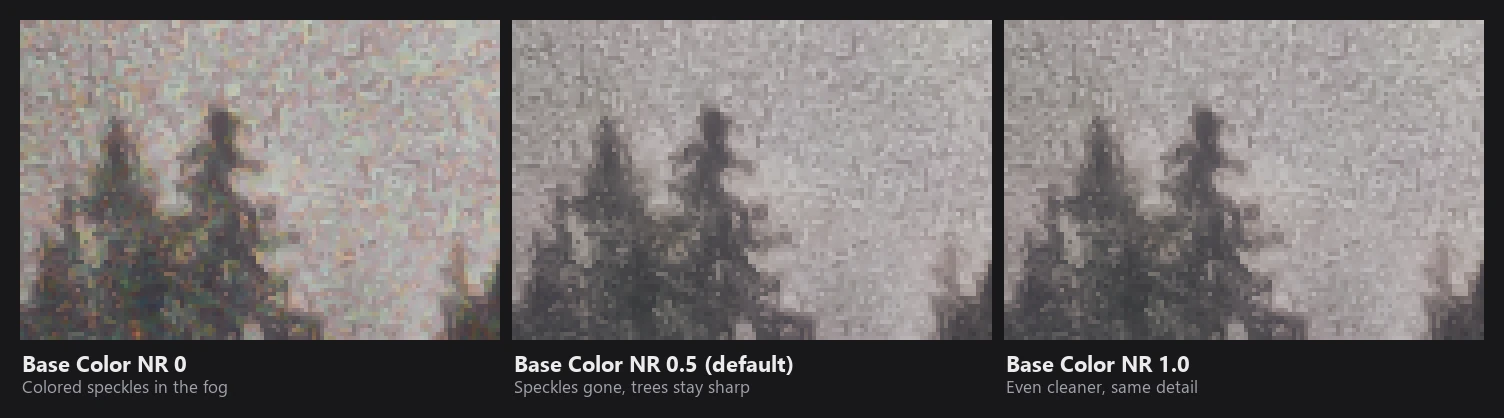
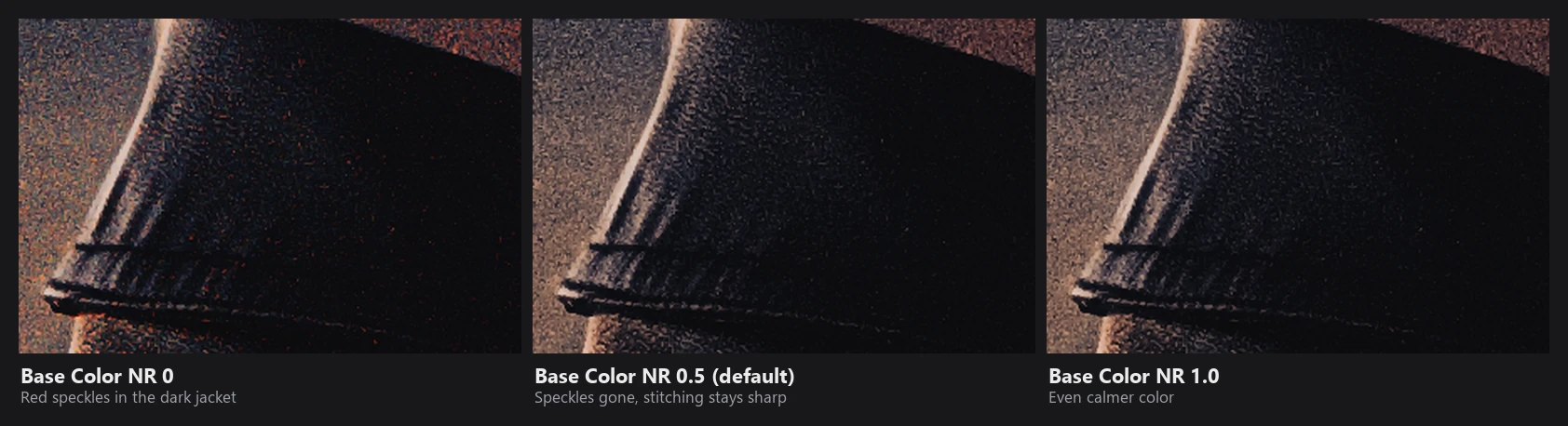
Any demosaicer guesses wrong on very fine detail near the pixel pitch, which shows up as colored speckles or moiré on detail that is actually grey. RapidRAW removes this in the next stage, Base Color Noise Reduction: chroma that only follows the luminance texture is pulled back to the smooth color of the surroundings.
4. White balance
The camera stores the white balance as channel multipliers ("as-shot neutral"). RapidRAW does not multiply the channels before demosaicing. Instead:
- For highlight reconstruction, the data is temporarily white balanced so a neutral object has R = G = B.
- The white balance is then undone, and the camera color matrix maps the camera's as-shot white to D65 white with a Bradford chromatic adaptation (see the next section).
So the decoded image is balanced to "as shot". Your Temperature and Tint edits are applied later on the GPU as an additional Bradford adaptation in LMS space, relative to as shot. The as-shot temperature and tint shown in Kelvin mode are calculated with Robertson's method from the camera neutral.
5. Highlight reconstruction
When a bright area is clipped in one or two color channels, a naive conversion produces wrong colors: skies turn cyan or flat yellow, and fully clipped areas turn magenta. RapidRAW reconstructs the missing channels while decoding. There is no setting for it; it always runs on Bayer and X-Trans files.
Step 1: find the real clip level. Many cameras saturate slightly below the white level written in the file. RapidRAW builds a histogram of each channel between 0.75 and 1.25 (2048 bins) and looks for a sharp plateau, the pile-up of clipped pixels. A peak counts as a plateau when it is at least 8 times higher than the bins just below it and few pixels are above it. If no plateau is found, the lowest detected level (or 1.0) is used.
Step 2: learn how the channels relate. Around every clipped area (within 24 px), RapidRAW looks at pixels that are bright but not clipped, and learns how each channel compares to the other two:
opposed(c) = ( (∛p_other1 + ∛p_other2) / 2 )³      cube-root mean of the other two channels
offset(c)  = weighted average of (p_c − opposed(c)),  weight = (p_c / clip)²
These offsets are stored on a coarse grid (cells of up to 8 px) and the gaps are filled smoothly with a push-pull pyramid. This gives a local "color model" for every clipped area: for example, that red is normally a bit higher than green and blue in this sunset.
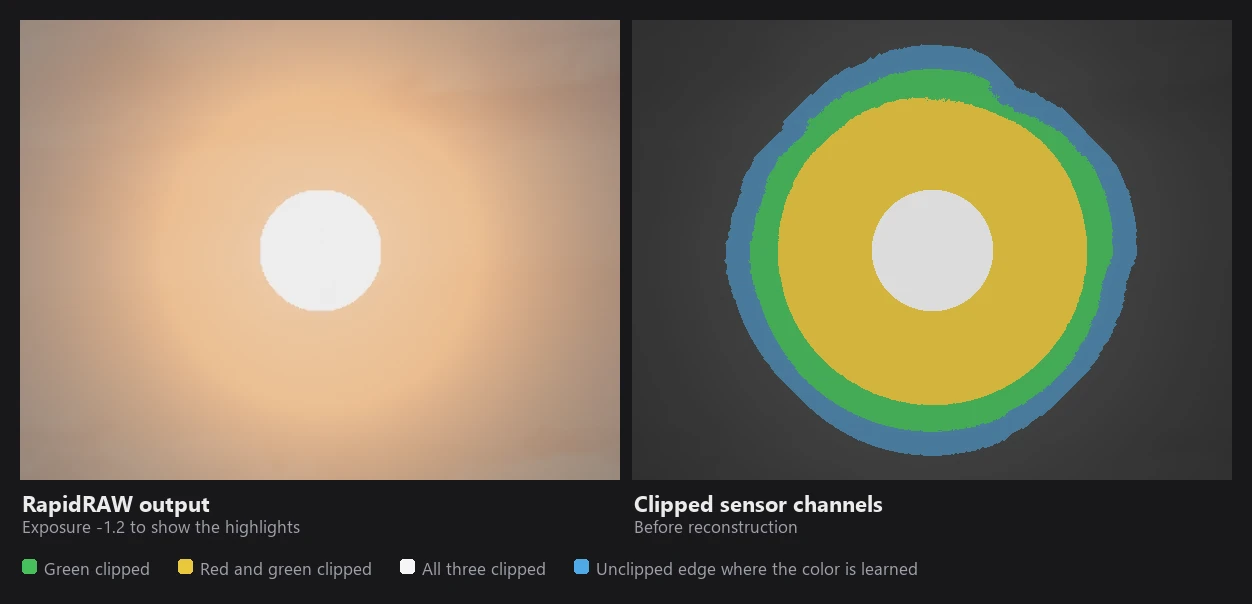
Step 3: rebuild the clipped channels. For every pixel close to clipping:
blend   = smoothstep(0.90·clip, 0.985·clip, observed)       soft start at 90 % of clip
rebuilt = max(observed, opposed + offset)                   never darker than recorded
p       = observed + (rebuilt − observed)·blend             3 iterations
Step 4: keep light sources neutral. When all channels are near clipping (the sun, lamps), there's little real color information left. The rebuilt color is pulled toward neutral, down to 35% of its saturation, depending on how close the least-clipped channel is to clipping.
Step 5: fill fully blown cores. Pixels where all three channels are clipped get a gentle tint borrowed from the surrounding ring (half strength, in log space), so a blown sun is a warm white rather than pure white or magenta. Brightness is preserved.
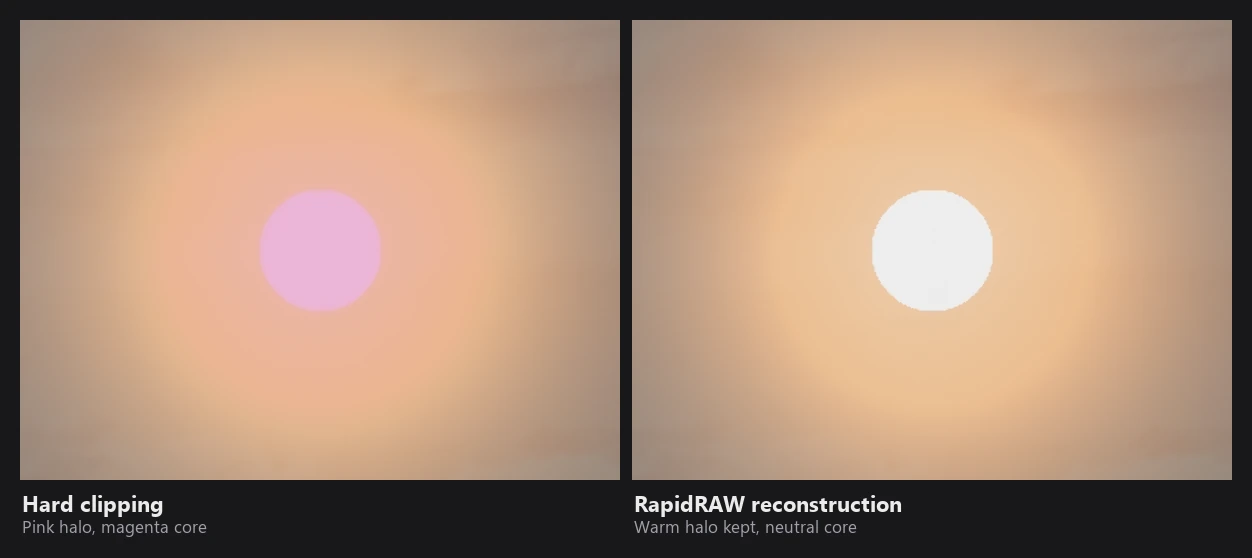
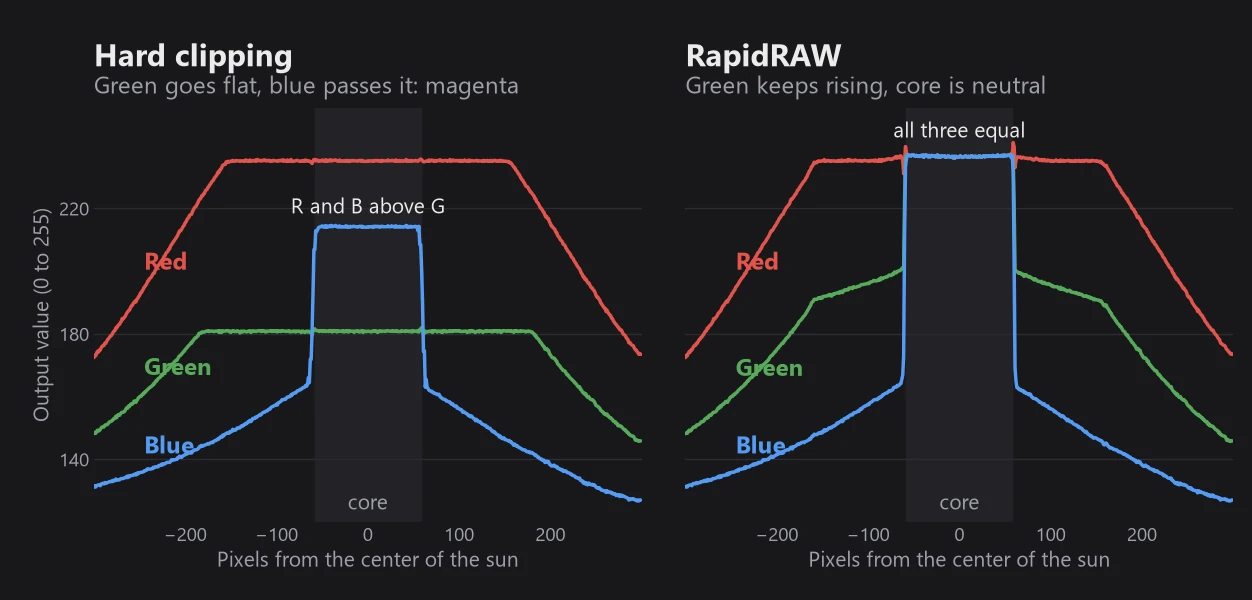
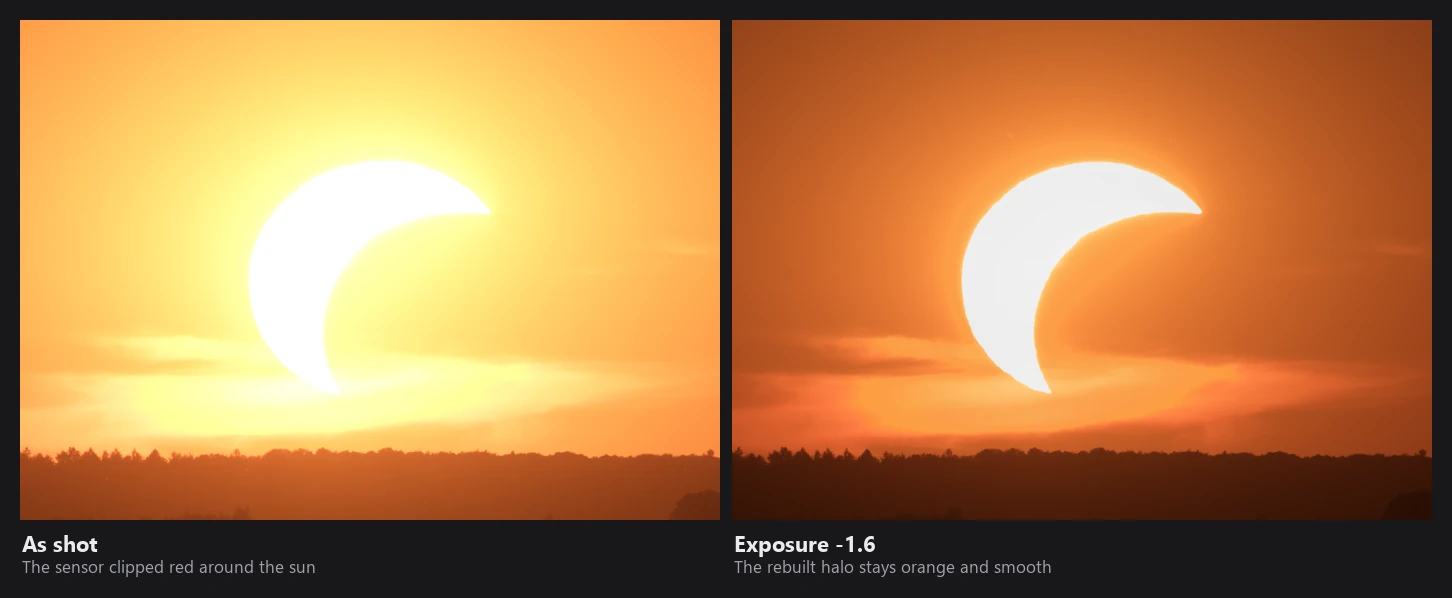
Files without a usable color matrix, linear DNGs and 4-color sensors use a simpler per-pixel method after color conversion: clipped green under red and blue (the classic magenta cast) is filled in, and colors are smoothly desaturated as they approach and exceed white.
6. Camera color
Color matrices. Each camera has matrices that convert its RGB to CIE XYZ. Most cameras have two, measured under tungsten (illuminant A, 2856 K) and daylight (D65, 6504 K). RapidRAW blends them according to the white balance of the shot, as the DNG specification describes:
M = M_D65
repeat until the temperature changes by less than 0.1 K (max 20 times):
    T = color temperature of the as-shot white using M
    w = clamp( (1/T − 1/6504) / (1/2856 − 1/6504), 0, 1 )      blend in mired
    M = w·M_A + (1 − w)·M_D65
So a tungsten-lit photo uses the tungsten matrix, a daylight photo the daylight one, and anything in between a mix. This gives more accurate colors under artificial light than using the daylight matrix alone.
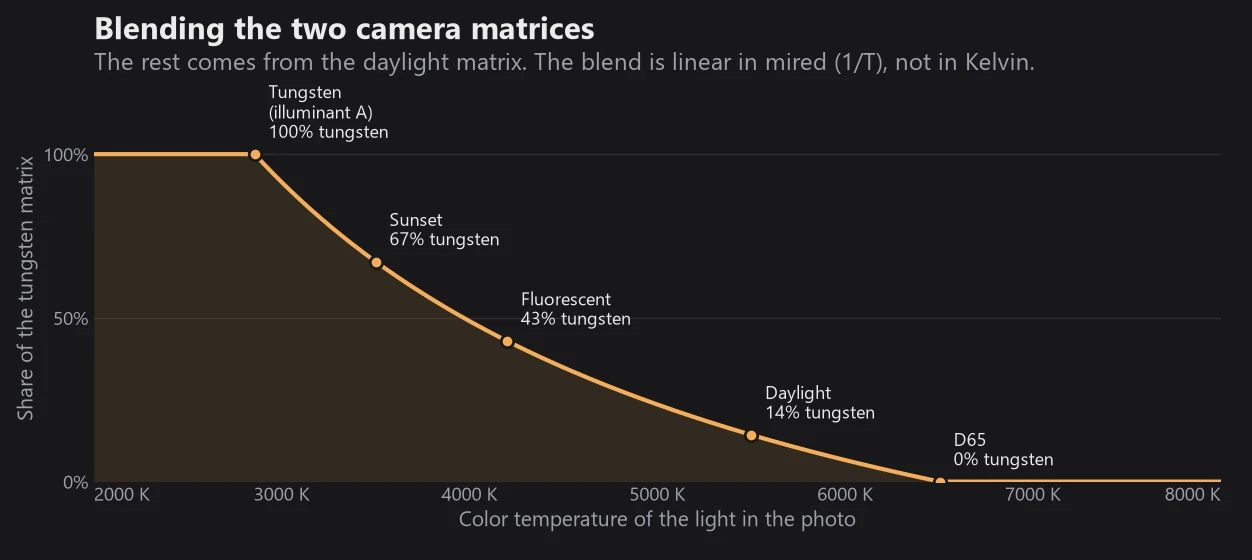
w from the formula above. Below 2856 K only the tungsten matrix is used, above 6504 K only the daylight one. Because the blend is linear in 1/T, most of the change happens at the warm end.Camera to sRGB:
C = pseudo-inverse(M)                        camera → XYZ
T = M_XYZ→sRGB · Bradford(as-shot white → D65)
camera → sRGB = T · C
Gamut compression. Some colors a camera records (deep blue LEDs, saturated flowers) are outside the sRGB gamut and would produce negative values. Simply clipping them causes harsh, blotchy color. RapidRAW compresses them smoothly toward the neutral axis with the ACES reference gamut compression curve:
a = max(r, g, b)                    the neutral value
d = (a − channel) / a               distance from neutral (> 1 means negative)
f(d) = d                                       if d ≤ 0.8
f(d) = 0.8 + (d − 0.8) / (1 + ((d − 0.8)/s)^1.2)^(1/1.2)   otherwise
channel = a − f(d)·a
Unlike ACES, which uses fixed limits, RapidRAW computes the limit for each camera from its own primaries, so the most saturated color the camera can record lands exactly on the edge of the gamut. Compression is only enabled for channels that can actually go negative for that camera.
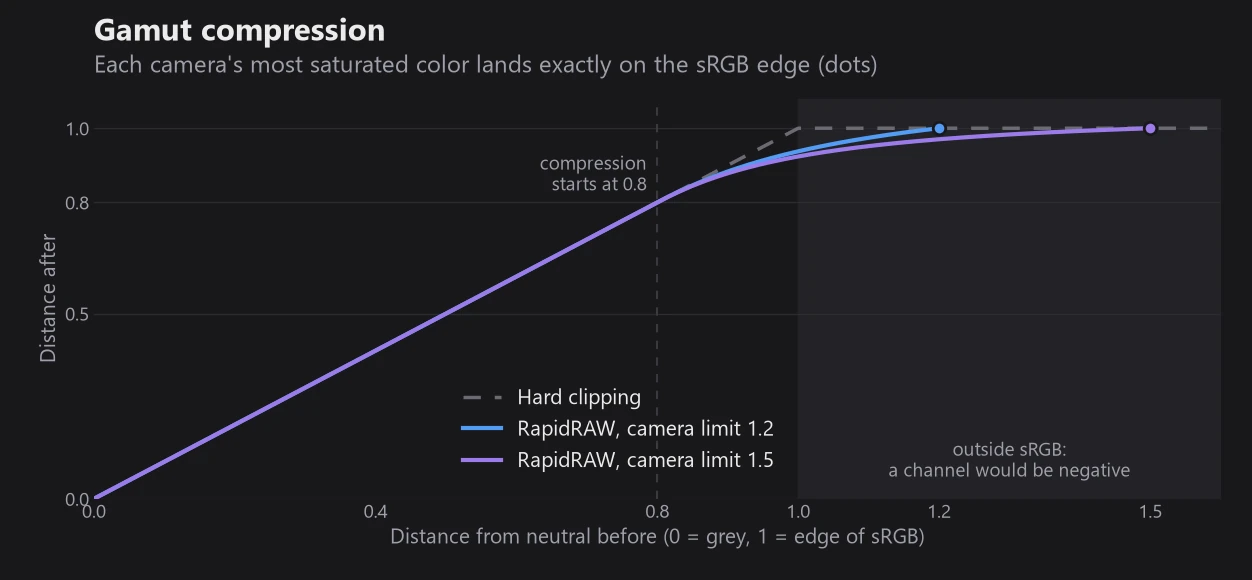
The result is linear Rec.709/sRGB RGB with a D65 white, uploaded to the GPU as 16-bit float.
7. Base Color Noise Reduction
Default 0.5, in Settings → Image Preprocessing. This stage removes color noise and demosaicing false color before you start editing, and never touches luminance. It runs on RAW files only, unless "Apply Preprocessing to Non-RAWs" is on.
First, the image is converted to square-root opponent channels:
q  = √(L + 0.002)           L = Rec.709 luma
cr = √(R + 0.002) − q
cb = √(B + 0.002) − q
Then it goes through these steps:
- Variance stabilization: the square root makes photon noise roughly equal at all brightness levels, so one setting works for shadows and highlights.
- Noise estimate: the noise level of luma and chroma is measured automatically from the image (median absolute differences), so the filter adapts to each photo's ISO.
- Multi-scale filtering: a reference is computed at quarter resolution, upsampled with a guided step, and used as the target for the main filter at half resolution. The filter is a 5x5 joint filter whose weights depend on distance, on luma similarity and on how close each neighbour's chroma is to the reference. It fits a local linear model of chroma against luma: chroma changes that follow luma edges (real colored edges) are kept; chroma that does not follow luma (noise) is averaged out.
- Texture-aware coring: a chroma deviation only survives if it is clearly larger than the noise floor plus a margin proportional to the local luma texture. This is what removes demosaic false color in fine detail.
- Full-resolution reconstruction: the result is guided-upsampled to full size, clamped to the range of the coarse neighbours (no new colors or halos), and RGB is rebuilt at the original luminance.
8. Base Pre-Sharpening
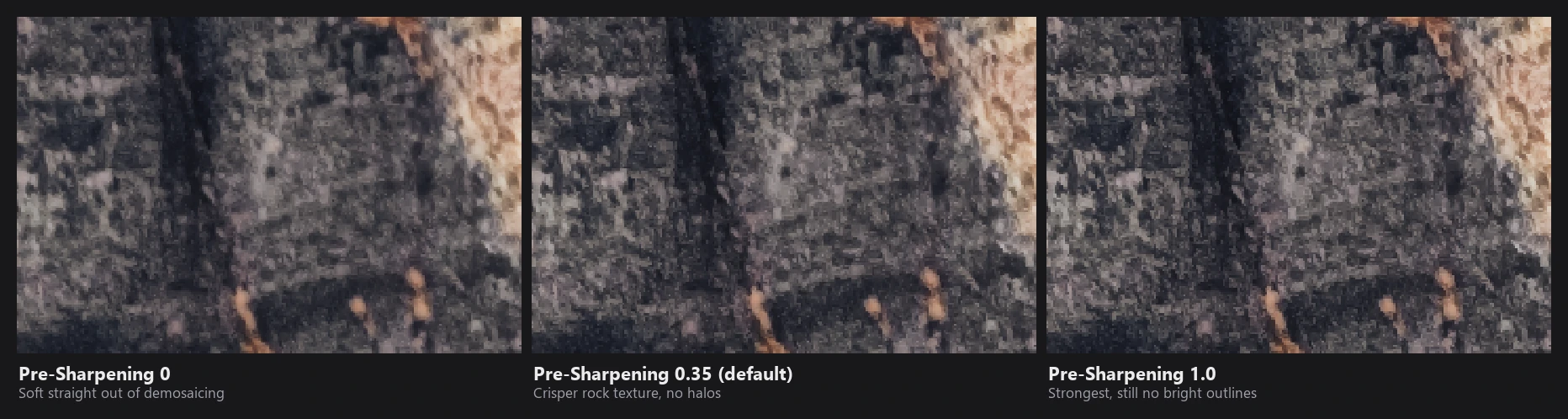
Default 0.35. A gentle unsharp mask on square-root luminance that recovers the slight softness of demosaicing:
d     = q − blur5x5(q)                         q = √luma, binomial [1 4 6 4 1] blur
d     = d³ / (d² + (1.5·σ_noise)²)             soft coring: noise-sized detail is ignored
d     = d / (1 + |d|·taper)                    large edges are compressed
delta = 4.5·amount·d
The change is then limited against the local 3x3 minimum and maximum, so bright overshoot can exceed the neighbourhood by at most about 15% of the local range, and dark overshoot by about 5% (dark halos are more visible, so they're limited more). The result is applied as a luminance ratio, so colors don't shift, and it never creates new values above 1.0.
9. Baseline exposure and highlight-preserving modes
Baseline Exposure (off by default) adds a fixed amount (default +0.7 EV, like darktable) plus the DNG BaselineExposure tag. It is added invisibly to the Exposure slider, so RAWs open at a similar brightness to other editors.
Highlight Preservation Compensation (on by default) reads the maker notes and brightens files from camera modes that deliberately underexpose:
| Camera | Mode | Added |
|---|---|---|
| Fujifilm | DR200 / DR400 | +1 / +2 EV |
| Canon | Highlight Tone Priority | +1 EV |
| Canon | Auto Lighting Optimizer low / standard / high | +0.33 / +0.5 / +0.66 EV |
| Nikon | Active D-Lighting (by level) | +0.33 to +1.33 EV |
| Nikon | HLG tone mode | +2 EV |
| Olympus / OM | Gradation settings | +0.33 / +0.66 EV |
| Pentax | Dynamic Range Expansion | +1 EV |
The total is clamped to −1 to +4 EV. Both only apply to new edits, so older edits keep their look.
10. Linear DNGs
Linear DNGs (already demosaiced, for example from phones and HDR tools) skip demosaicing. The four Linear RAW Processing options control two switches:
| Option | Applies the color matrix | Undoes a gamma curve |
|---|---|---|
| Auto | yes | no |
| Apply Gamma | yes | yes |
| Skip Calibrate | no | no |
| Apply Gamma & Skip Calibrate | no | yes |
"Skip Calibrate" treats the stored RGB as linear sRGB directly, which fixes color casts when a file's matrix doesn't match its data. "Apply Gamma" is for files that store gamma-encoded data in a linear container.
11. Performance
- Almost every step runs in parallel across all CPU cores (Rayon), with SIMD for the hottest loops.
- A file being decoded for the editor, a thumbnail and an export at the same time is only decoded once.
- Decoding is cancelled as soon as you switch to another photo.
- Thumbnails of unedited RAWs use the embedded JPEG unless "Always Decode RAW" is on, in which case a fast quarter-resolution decode is used.